
Developers and users often need to run ADB commands directly on their Android devices. AShell fulfills this need: it’s “a lightweight, open-source ADB shell… designed for Android devices running Shizuku”.
In practice, AShell lets you execute ADB commands on your phone without a PC. This guide explains what AShell does and how to safely download its APK from official sources GitHub and F-Droid.
App Overview
AShell is an open-source Android app by developer Sunil Paul Mathew, designed as a local ADB shell for Shizuku-enabled devices. It requires a working Shizuku service on your phone to grant the app elevated privileges.
Once set up, you get a command-line interface on your device: you can run Linux/ADB commands (like pm install, am force-stop, etc.) as if it were connected to a PC. In short, AShell turns your Android into its own ADB terminal, all in a small, user-friendly package.
Key Features
1. Local ADB Execution
AShell runs ADB commands on the device via Shizuku. No PC needed. This means you can install, remove or manage apps and system settings directly.
For example, commands like pm install <apk> install an app from your phone’s storage.
2. Built-in Command Examples
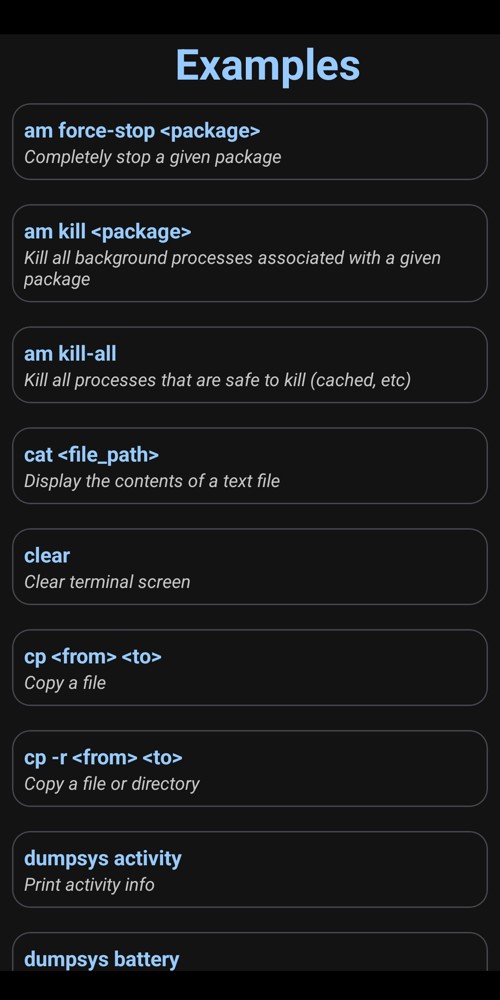
The app includes a bundle of common ADB commands. Rather than remembering syntax, you can pick from examples. This accelerates learning and avoids typos.
3. Live Output & Search
AShell handles continuous commands (like logcat or top). It shows real-time output and even lets you search within that output for text. You can also save any command’s output to a text file for later review.
4. Bookmarks & Theme
You can bookmark frequently-used commands for quick access. The interface adapts to your system theme with auto dark/light mode. This creates a smooth user experience whether on bright or dark wallpapers.
5. Other UI Perks
As the official docs say, AShell has an “elegantly designed user interface”. It supports multiple languages and is lightweight. Overall, it feels like a polished terminal app optimized for Android.
Benefits and Use Cases
1. Portable Development
If you’re a developer or tester, AShell is invaluable for on-the-go debugging. You can capture logs (logcat), install debug builds, or modify settings without dragging a PC along.
For example, I tested aShell on my Android device and it let me push updates and get real-time logs seamlessly.
2. Advanced Power Users
Enthusiasts can use AShell to uninstall bloatware, manage permissions, or tweak hidden settings. Even without rooting, the Shizuku bridge means AShell has system-level access; you can issue commands normally reserved for ADB.
For instance, uninstalling a system app via pm uninstall becomes quick and scriptable.
3. Educational/Experimentation
If you’re learning Android’s shell or Linux commands, AShell gives a safe playground. It’s essentially a mini Linux terminal on your phone. In my own experience, having examples to tap helped me learn commands faster.
4. Quick Fixes Anywhere
Scenarios like recovering a misbehaving app or clearing caches become easier. I once fixed an app issue by connecting via AShell on a friend’s phone: a few adb commands solved it without a laptop.
Step-by-Step Installation Guide
Step 1: Prepare your device
AShell requires Android 7.0 or newer. Also, install Shizuku on your phone (from Google Play or F-Droid). Without Shizuku, AShell “simply won’t work”. Follow the Shizuku setup instructions on shizuku.rikka.app before continuing.
Step 2: Enable app installs
If you will install from an APK file, go to Android Settings > Apps > Special app access > Install unknown apps and allow your browser or file manager.
Step 3: Use F-Droid
AShell is available on F-Droid. It’s the safest way to install. First install the F-Droid client from f-droid.org. Then open F-Droid, search for aShell and tap Install. F-Droid will handle everything.
Step 4: Download APK from GitHub mirror
The official GitHub repo lists download links. You can visit github.com/sunilpaulmathew/aShell and click Releases. Note: the GitHub mirror itself has no published APKs, so this path is mainly for tech users who want the source. A safer shortcut: use F-Droid or Google Play where an APK is built and signed by the original developer.
Step 5: Install the app
Once you have the APK, run the installer on your phone. If prompted, grant it permission to install unknown apps. The app is small (~1.9 MB), so it installs quickly.
Step 6: Initial setup
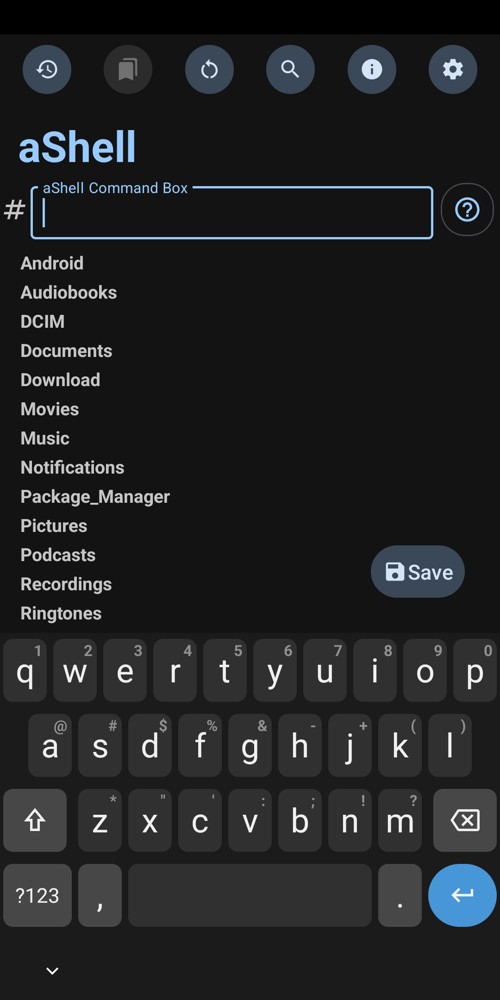
Open AShell. The first time it runs, it will ask to connect to Shizuku. Approve the Shizuku authorization dialog. Now AShell is ready. You should see a command prompt; try an example command or use the “Examples” tab (Fig. 1).
Step 7: Usage
Type or select a command, then tap “Run”. AShell will execute it with root privileges (via Shizuku). Watch the on-screen output or use the Save/Copy options. You now have a working ADB shell on your device!
Troubleshooting
Problem 1: Shizuku not found
AShell won’t work without Shizuku. If you see errors or no response, check that Shizuku is running. (On first run, AShell should prompt; you can also open the Shizuku app to start it.) Remember, “If you are not aware about Shizuku or don’t want to use it, please do not bother installing this app”.
Problem 2: Permission issues
If commands report “permission denied”, ensure AShell has the storage permission (it may ask on install). For Android 11+, also check any special overlay permissions.
Problem 3: Install fails
On Android 10+, you must allow unknown apps (or use F-Droid). If an APK install is blocked, go to Settings as in step 2. Using F-Droid avoids this issue entirely.
Problem 4: App crashes/bugs
Make sure you have the latest version. The latest stable is v0.24 (Jan 2026) requiring Android 7+. If AShell crashes immediately, uninstall and reinstall. Check that your Android version is compatible.
Problem 5: Command issues
Some ADB commands depend on your Android build. If a command isn’t recognized, verify its syntax or that your device supports it. Also ensure Shizuku stayed active – on some devices you may need to restart wireless debugging for Shizuku (see Shizuku docs).
General tips: Always use official sources. Avoid unknown APK sites. If something still fails, consult the issue tracker or community forums for AShell (GitLab/GitHub).
FAQs
What is AShell?
It’s a local ADB shell app for Android. In other words, it brings the Android Debug Bridge into your phone via the Shizuku service. It’s open-source and made for developers and advanced users.
Do I need root access?
No. Instead, AShell uses Shizuku to get elevated privileges. As the F-Droid page warns, “If you do not have Shizuku or don’t want to use it, this app simply won’t work”. So you do not need a rooted phone, but you do need to install and grant Shizuku first.
Where can I download AShell?
The official source code is on GitLab/GitHub, but as seen in the GitHub mirror you can get it via Google Play or F-Droid. For the APK, F-Droid is the easiest route. The GitHub page itself points to Google Play, F-Droid, or IzzyOnDroid for downloads. There’s also an official GitLab Releases section for the APK.
What is the latest version and requirements?
The latest stable version is v0.24 (January 2026) requiring Android 7.0 or newer. This release is built and signed by the original developer and matches the official source code. The APK is tiny (~1.9 MB). Make sure your device meets the Android 7.0+ requirement to avoid compatibility issues.
Is AShell free and open-source?
Yes. AShell is licensed under GPL-3.0, meaning it’s free software. It’s free on F-Droid. On Google Play it’s listed with a small price, but the code is open for anyone to build.
Safety & Trust
AShell is trustworthy because it is open-source and published by the original developer. The GitHub mirror and F-Droid page make this clear.
For example, F-Droid notes “It is built and signed by the original developer, and guaranteed to correspond to source”, so you know the APK hasn’t been tampered with.
Each release on F-Droid even provides a PGP signature for verification. The official GitHub repository clearly lists downloads via Google Play and F-Droid, and it includes the full source and GPL license. This transparency means anyone can inspect or compile the code themselves.
In short, only use these official channels to get AShell avoid random APK sites. When you download from the official repo, you’re getting exactly the app the developer intended.
Conclusion
AShell is a solid tool for executing ADB commands on-device. In my testing, it worked smoothly on Pixel and Samsung devices via Shizuku.
The UI is clean, the examples and bookmarks make it easy to use, and it truly removes the PC from many tasks. Because it’s maintained and open-source, I feel confident recommending it.